Private location sharing for iPhone

Know everyone's home safe.

Skylark is a private map for the people you'd text “home yet?”. Everyone in your flock sees where the others are, and nobody else does.

Coming soon Skylark is coming soon to the App Store

Free, with optional Skylark Premium
iPhone, iOS 17 or later ยท Ages 13 and up

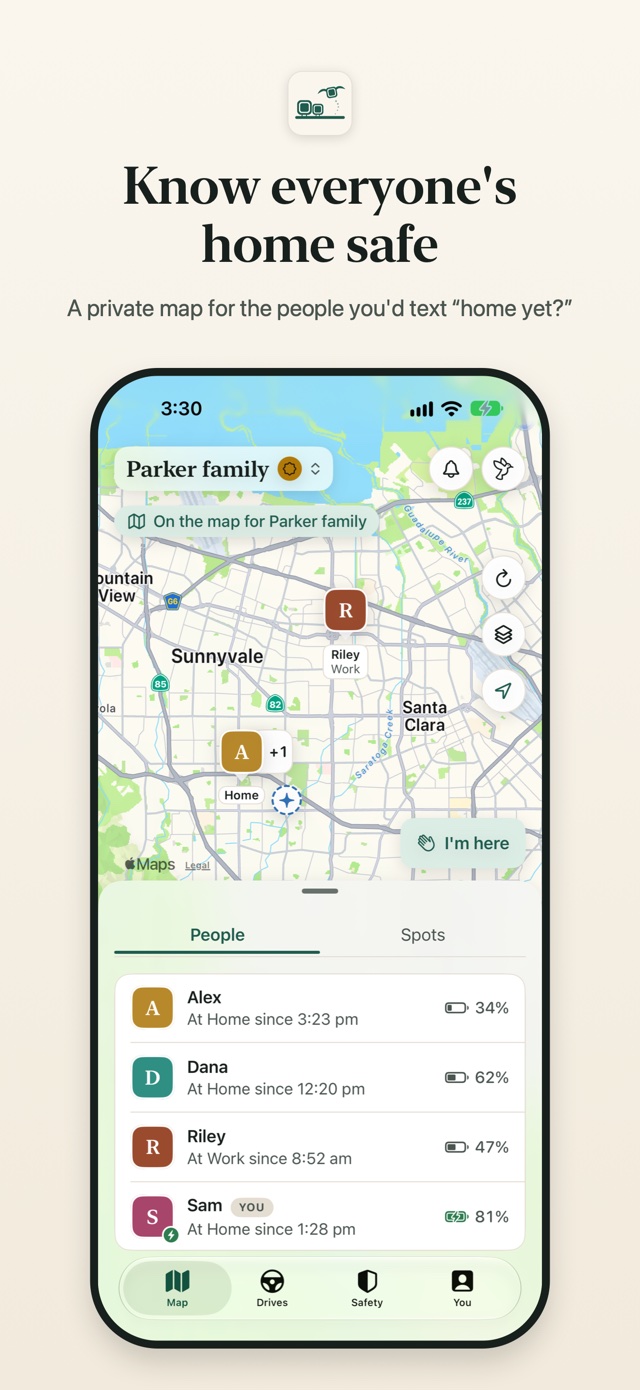
Skylark's map: the Parker family flock, with Alex at Home, Riley at Work, and each person's battery in the list below

What it does

A calm map for the people who matter.

A flock is a small private group: your family, a couple, a few close friends. Everyone installs Skylark on their own iPhone and joins with an invite code.

One calm map

See your flock on a live map, with each person's battery and how fresh their position is.

  • Tap “I'm here” to tell everyone you've arrived.
  • Every position shows its age, so an old one never passes for live.
  • Start a trip flock for a weekend away; it wraps up on its own.

Spots and alerts

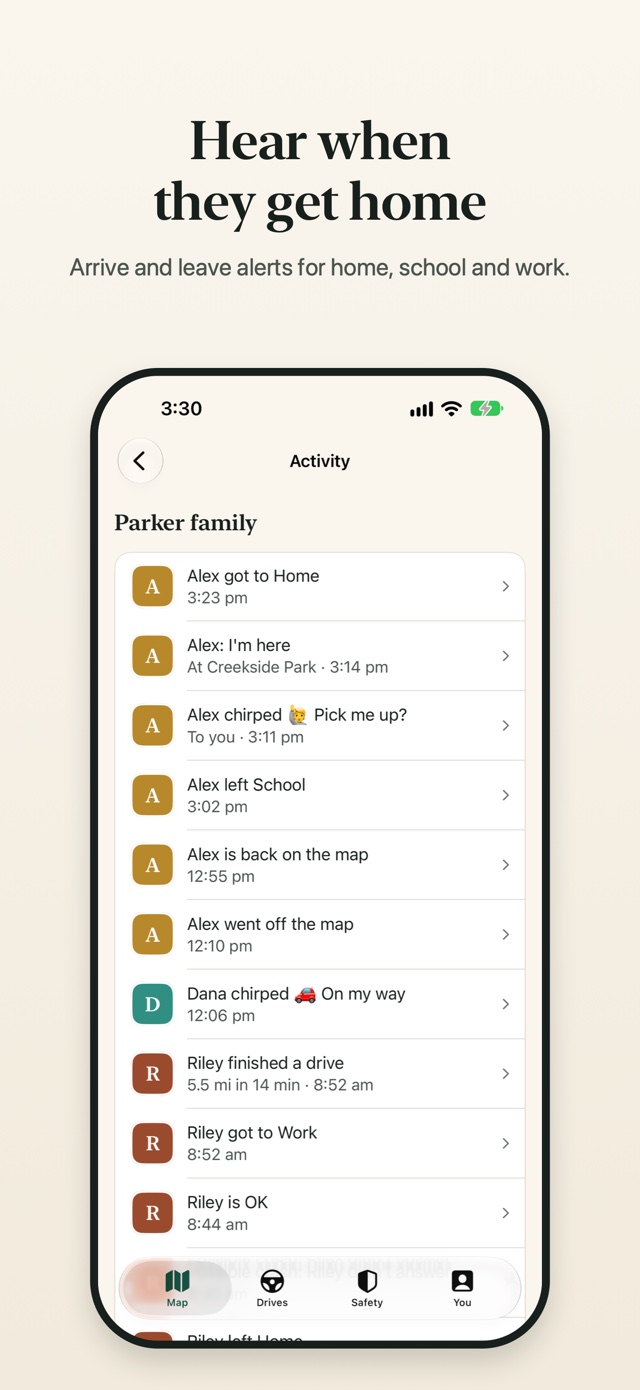
Save home, school, work and the places that matter, and get a nudge when someone gets there or heads out.

  • Late alerts: hear if someone isn't at school by 8:30.
  • A heads-up when someone's battery runs low.
  • A touchdown alert when their flight lands.

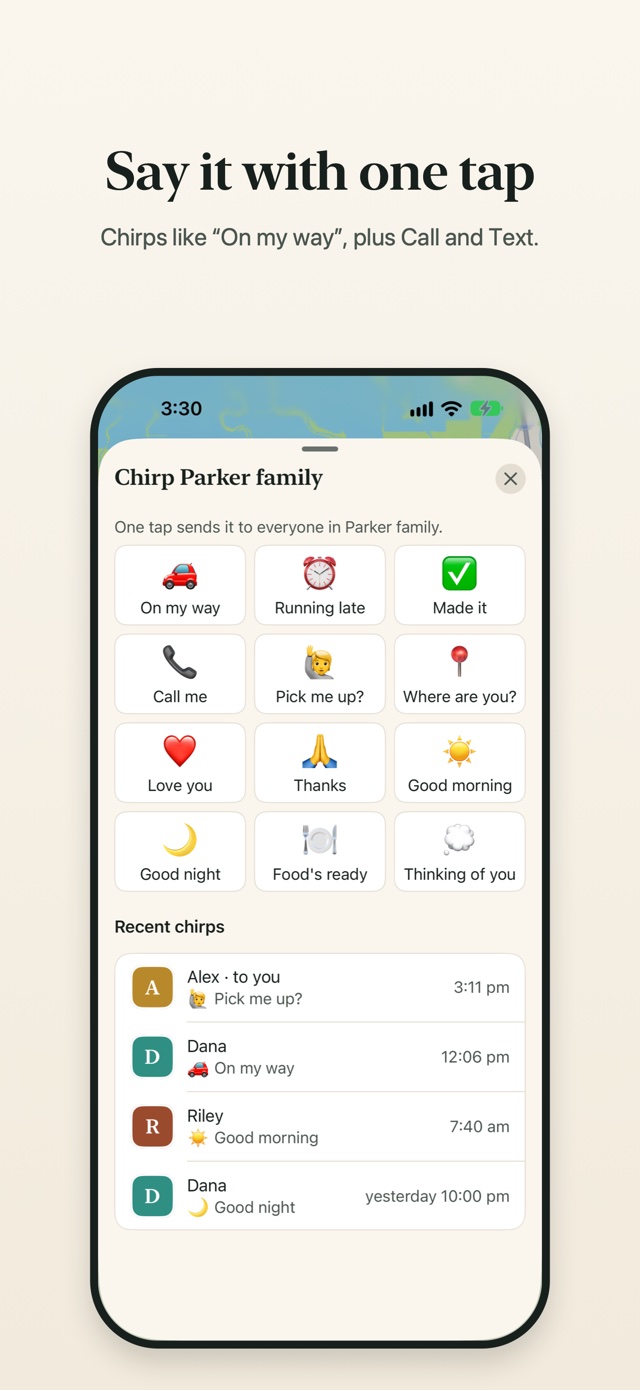
Chirps, not chat

Send a one-tap chirp to one person or the whole flock. Call and Text open your phone's own apps.

๐Ÿš— On my wayโฐ Running lateโœ… Made it๐Ÿ“ž Call me๐Ÿ™‹ Pick me up?๐ŸŒ™ Good night

History and drives

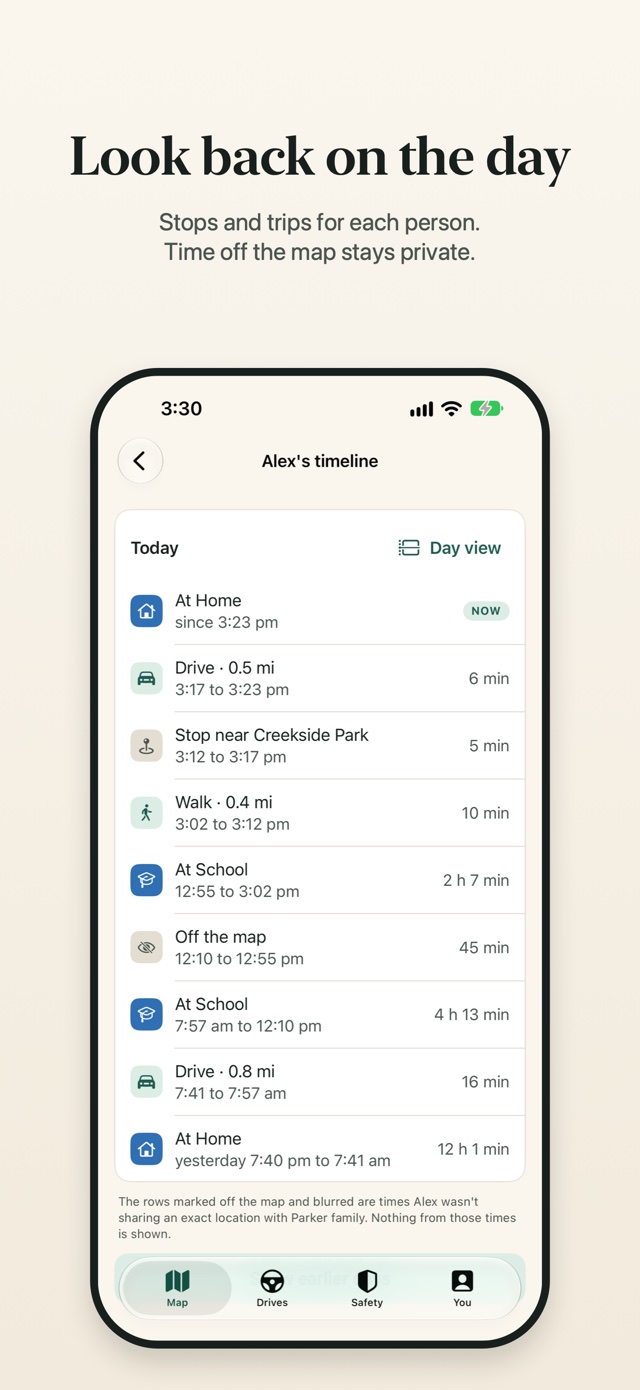
Look back at each person's stops and trips, day by day.

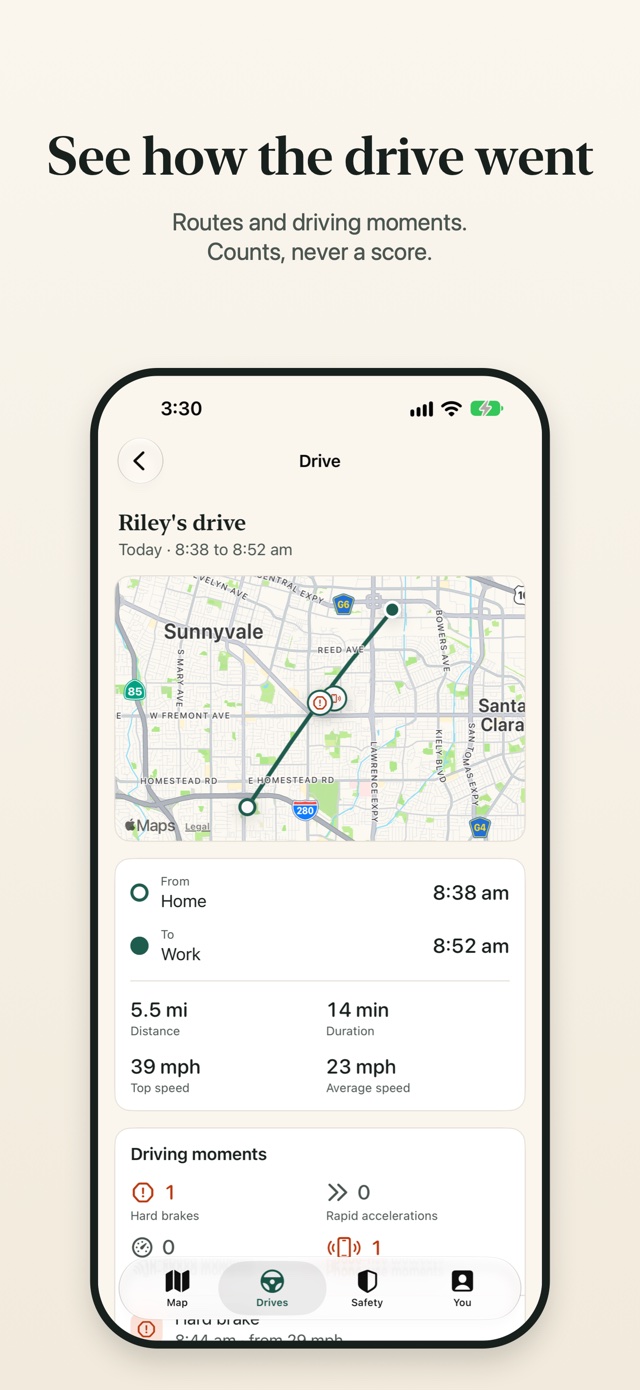
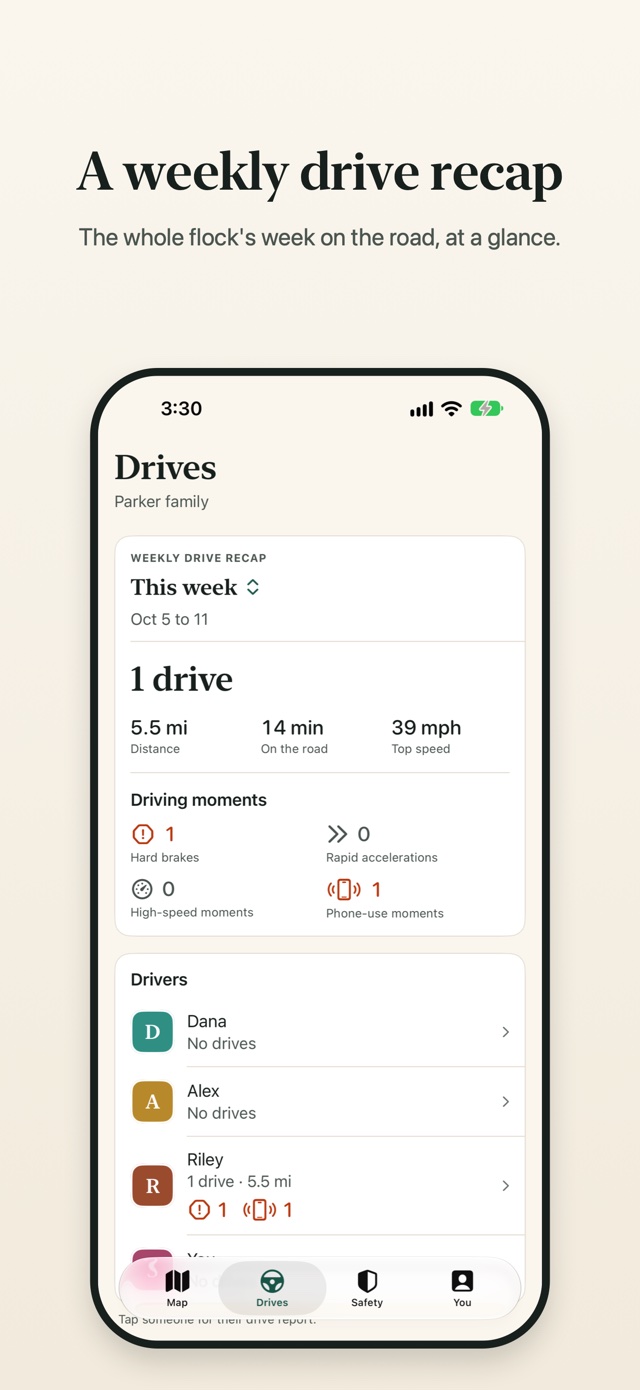
  • Drives are detected on their own, with the route and driving moments like hard braking or phone use.
  • A weekly drive recap for the whole flock. Counts, never a score.
  • Time spent off the map stays private.

Help when it matters

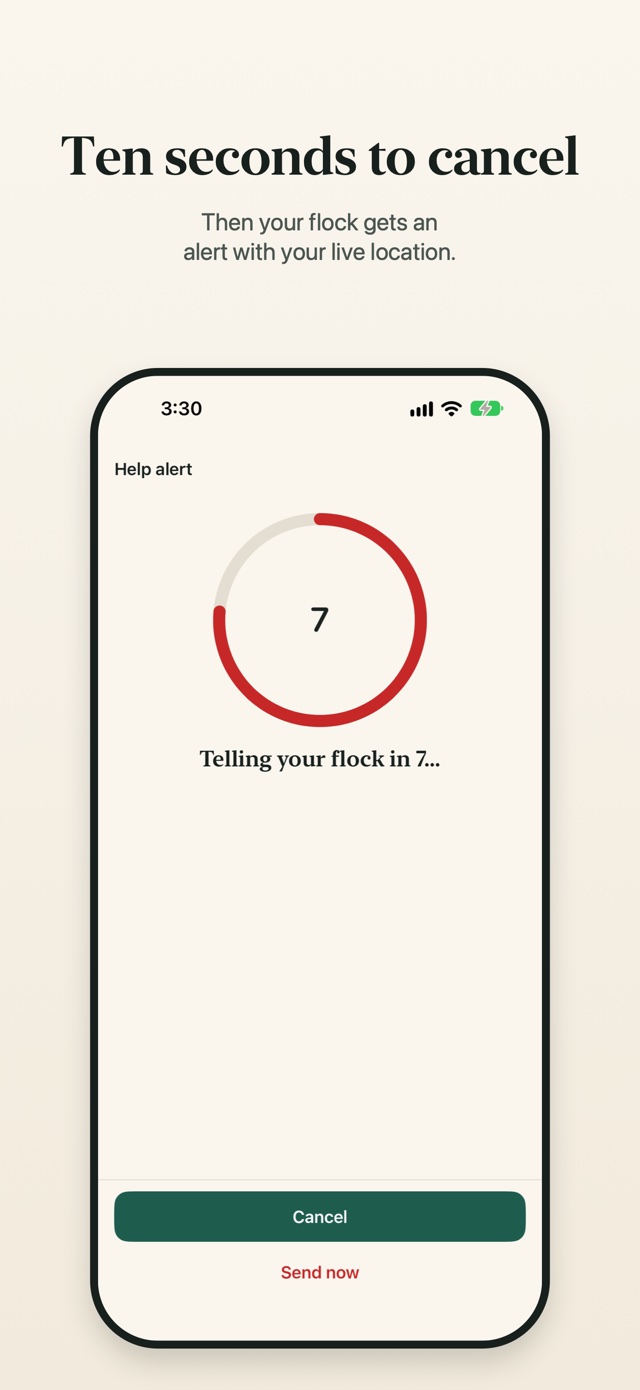
Hold the help alert button. You have 10 seconds to cancel; then your flock gets an urgent alert with your live location.

  • Turn on crash check and Skylark asks if you're OK after a possible crash. If you don't answer, it alerts your flock.
  • Crash check can miss real crashes and can raise false alarms.

Skylark alerts your flock. It doesn't contact emergency services. In an emergency, call 911.

Guest links

Share your live location with someone who doesn't have the app, until a time you choose.

  • For an hour, a few hours, or until the end of the day.
  • They open a simple web page; nothing to install.
  • Stop a link early whenever you like.

Your choice

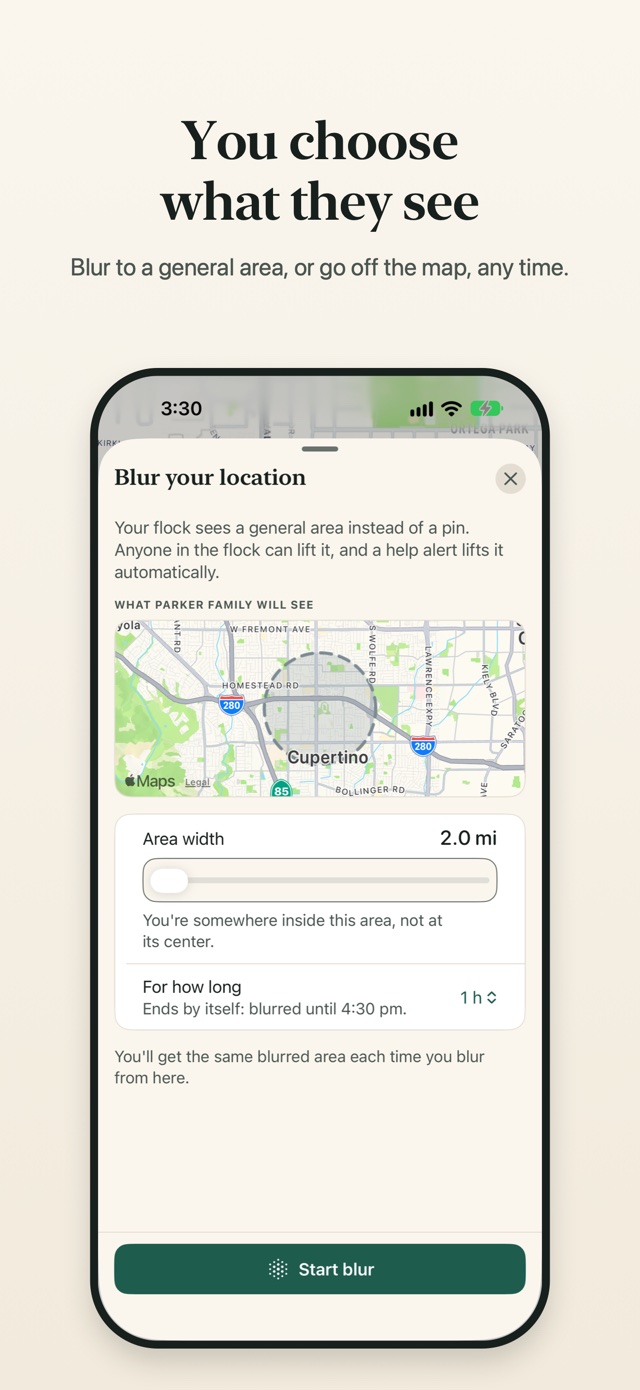
You choose what they see.

A line on the map always says who can see you. Change it with one tap.

  • On the map
    Sharing with your flockYour flock sees where you are, live. If you're in more than one flock, each one has its own switch.
  • Blurred
    Blur to a general areaYour flock sees an area instead of a pin, for as long as you choose. Anyone in the flock can lift it, and you're told; a help alert lifts it automatically.
  • Off the map
    Go off the mapYour flock sees where you were, not where you are, and nothing recorded meanwhile is ever shown to them. Help alerts still share your location.

Private by design

Your flock, nobody else.

  • No ads. No selling or sharing your data. Ever.
  • No analytics or advertising tools inside the app.
  • No hidden mode. Your location is shared only with flocks you join, after you allow it on your own phone.
  • Everyone is told when someone new joins the flock.
  • Your data is yours. Download it or delete your account right in the app.

Read the privacy policy →

Screens

A look inside.

Free and Premium

Free for your whole flock. Premium for more room.

Safety features are free. One Skylark Premium subscription covers everyone in one flock.

Free

Skylark

Everything you need to stay in touch.

  • The live map, with battery and freshness
  • 2 spots with arrive and leave alerts
  • 2 days of history and drives
  • Help alerts and crash check
  • Chirps, “I'm here”, blur and off the map
  • The weekly drive recap
Premium

Skylark Premium

$6.99 per month

One week free for new subscribers. Covers everyone in your flock.

  • Up to 99 spots with arrive and leave alerts
  • 30 days of location history
  • 30 days of drives with routes and driving moments
  • A drive report for each driver
  • 5 weeks of weekly drive recaps

Skylark Premium is US$6.99 a month, with a one-week free trial for new subscribers. Payment is charged to your Apple Account when you confirm the purchase or, with a free trial, when the trial ends. It renews every month unless you turn off auto-renew at least 24 hours before the end of the current period. Manage or cancel it in Settings > Apple Account > Subscriptions. Terms of Use ยท Privacy Policy

Support

Help and answers.

Write to us

Questions, problems, ideas, or a report about someone in your flock:

info@rubotic.io

Reports about a person in your flock are answered within 24 hours.

In an emergency, call 911. Skylark alerts your flock; it doesn't contact emergency services.

How do I delete my account?

In the app: You tab > your name > Delete account (it's also under You > Privacy). You sign in again to confirm, then type DELETE.

Your account, location history and everything else in it are removed from Skylark straight away, and you leave every flock. Copies in our backups are gone within 7 days. Deleting your account doesn't cancel Skylark Premium, so cancel that with Apple first.

How do I download my data?

You tab > Privacy > Download my data. Skylark makes one file with your profile, your flocks, the spots you created, the location history still kept for you, your drives and your alerts. The file is deleted from our servers after 24 hours.

How do I cancel Skylark Premium?

Premium is billed by Apple, so you cancel it with Apple: open Settings > Apple Account > Subscriptions on your iPhone (on iOS 17, Settings > your name > Subscriptions), choose Skylark Premium and cancel. In Skylark, You tab > Membership > Manage subscription opens the same screen.

Cancel at least 24 hours before the renewal date to avoid the next charge. Deleting the app or your account doesn't cancel it. Refunds are handled by Apple at reportaproblem.apple.com.

How do I stop sharing my location?

Go off the map: tap your own card on the map and turn on Pause, or use You tab > Location sharing, which has a switch for each flock. Blur shows a general area instead of your position.

When you're off the map for every flock, Skylark stops recording your location, history and drives. Two things keep sharing on purpose: a guest link until it ends (stop it in Location sharing) and a help alert until you end it. You can also turn off Location for Skylark in your iPhone's Settings.

How do I leave a flock?

You tab > Flock > Leave flock. The flock is told you left, and its members stop seeing you. If you're the last person in it, leaving deletes the flock and its spots.

Someone in my flock is making me uncomfortable.

You can leave the flock or go off the map at any time, and a flock admin can remove someone. To tell us, open their card and choose “Report a problem with someone in this flock” (it writes an e-mail from your Mail app), or write to info@rubotic.io. We answer reports within 24 hours and can disable accounts that break our Terms of Use.

Who can see my location?

Only the people in the flocks you've joined, after you allowed location on your own phone, and anyone you send a guest link to, until the link ends. Nobody can join a flock without an invite code, and everyone is told when someone new joins. The privacy policy has the details.

Why does Skylark ask for “Always” location?

So your flock can see you made it, and get arrive and leave alerts, even when Skylark is closed. Drive detection and crash check need it too. If you choose “While Using” instead, Skylark still works and you still see your flock.

Does Skylark call 911?

No. A help alert tells your flock and shares your live location with them. The alert screen has a Call emergency services button that opens your phone's dialer, but Skylark never calls anyone itself.

Skylark app icon

Bring the flock home.

Skylark is coming soon to the App Store for iPhone. Free to download, for ages 13 and up.

Coming soon Skylark is coming soon to the App Store